EHR integration in Georgia
Clinics in Georgia can connect SetNow to EHR — the electronic health system of Georgia's Ministry of Health. This requires the institution's EHR account.
1. Check the company's country
The integration is available only to companies from Georgia. The country is set in Company → Company details.
We turn on the EHR module at the clinic's request — write to us to enable it.
2. Get the institution's account
This is the login and password the clinic uses to sign in to the EHR manager module. If you don't have an account, the Ministry issues one upon request to hcsp@moh.gov.ge.
3. Enter the login and password
Open Settings → EHR integration, enter the institution's login and password and save. The password is stored encrypted and is not shown to anyone, not even you. If you change the password in the Ministry's system, enter the new one here.
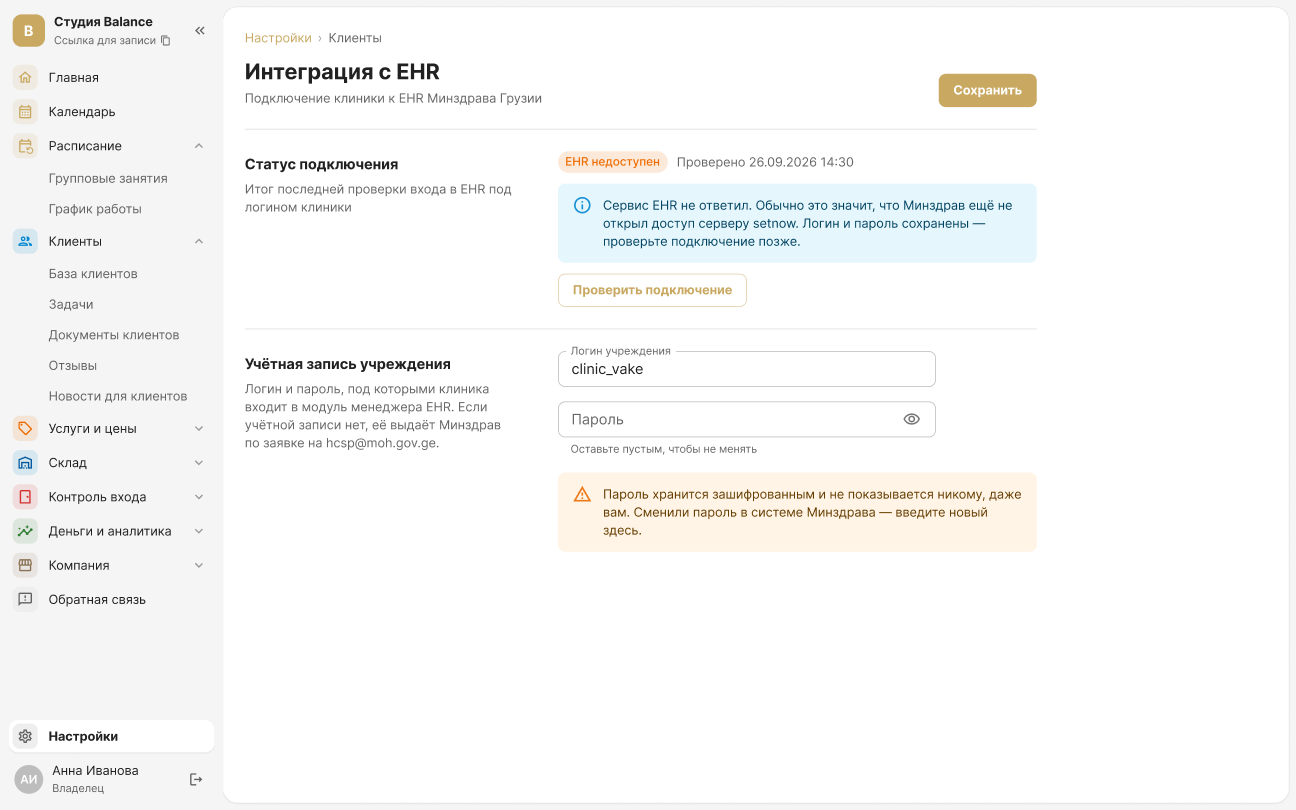
4. Check the connection
Click Check connection. The status shows the result:
- Connected — EHR accepted the login and password.
- EHR rejected the login or password — check the account details.
- EHR is unreachable — usually the Ministry hasn't opened access for the SetNow server yet. Your details are saved; check again later.