SMS packages and notifications
SMS to clients are paid from the company's SMS balance: confirmation codes, “You're booked”, reminders, links to sign documents.
1. Check your balance
Open Company → SMS packages: it shows how many SMS are available to send, how many came with your plan and how many were bought, and when the nearest package expires.
2. Buy a package
Choose a package and click Buy. The package is paid by invoice — the SMS are added to your balance as soon as the payment arrives.
3. Choose what to send to clients
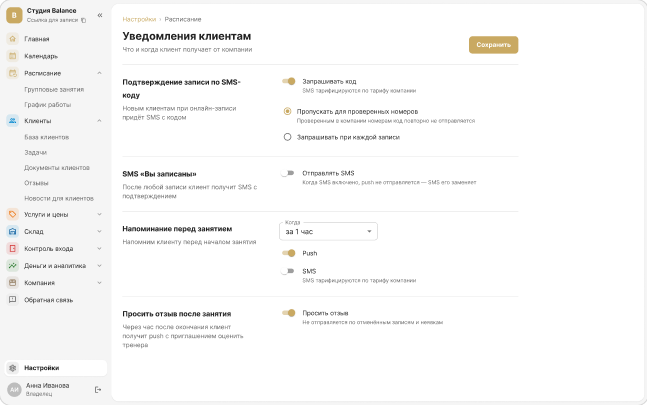
In Settings → Client notifications, turn on what you need:
- Booking confirmation by SMS code — for new clients booking online.
- “You're booked” SMS — after any booking.
- Reminder before the booking — 30 minutes, 1 hour, 2 hours or 24 hours before.
- SMS language — “Automatic” picks the language by the country of the client's number; if the client chose a language in the app, the SMS comes in that language.
When SMS is on, push isn't sent — SMS replaces it.
4. When SMS are running out
The owner gets an email when the balance drops to 10%, and 3 days before a purchased package expires. If SMS do run out, online booking doesn't stop — clients book without a confirmation code.
Other features use SMS too: links to sign documents and duplicated waitlist offers.