Booking link
Your company has a single booking page link, shared by all branches and employees. All you need to do is put it wherever clients find you.
1. Copy the link
The quickest way is the dashboard's left menu: click Booking link under the company name, and the link is copied.
It's also in Settings → Online booking, in the Link to the company page row: click the address to open the page in a new tab, or click Copy.
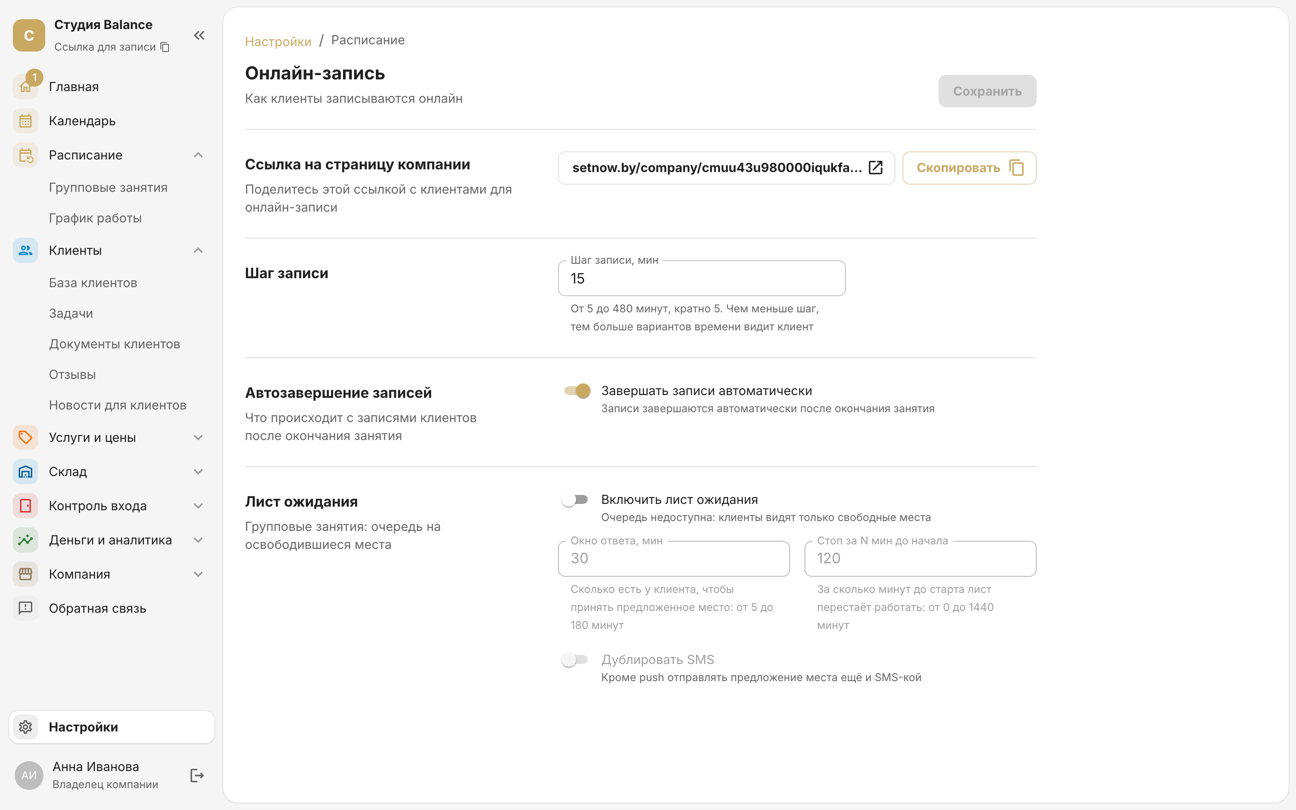
There are no separate links for individual employees: a client who wants a particular specialist starts booking from the Employee card.
2. Share the link
- in your Instagram bio and your Telegram channel description;
- in your business listing on maps;
- on your website, behind a “Book” button;
- in reply to “can I book?” messages in messengers.
In messengers and on social media, the link unfolds into a preview card with your company name and logo. Upload the logo in Company → Company details.
3. Check what clients will see
Open the link and go through the booking yourself. At the top of the page are the company's logo, name, address and phone: the address opens a map for the client, and the phone number lets them call. Below are the four cards of the booking steps.
- Language. The page opens in the company's language, and clients can switch it with the globe button in the top-right corner.
- Colours come from Settings → Theme — the same theme as in the client app.
- Times are shown in the company's time zone from Company → Company details, wherever the client is.
- Shop — a card under the booking steps, shown if online payment is connected and passes are on sale.
4. Show your schedule on your website
You can embed your group session schedule in your own website. In Schedule → Group sessions, click Embed code, then Copy code, and paste the code into your web page's HTML.
Your site will show a weekly schedule with free spots. Its Book button opens the booking page with the session already selected — the client only has to tap Continue and leave their contact details. Full sessions show No spots instead of the button.