Contacts from WhatsApp
WhatsApp has no contact export: it takes contacts from the phone's address book. So you export the address book itself — via Google Contacts on Android or iCloud on iPhone — into a Google CSV file that SetNow can read. It's easier on a computer.
Only saved contacts end up in the file. Clients who messaged you but aren't saved on the phone need to be saved first. Remove friends and family from the file before uploading — or export only the contacts you select.
Android: Google Contacts
- On a computer, open contacts.google.com with the same Google account as on the phone.
- Select your clients' contacts — or all of them.
- In the More menu, choose Export, pick Google CSV and click Export — a .csv file downloads.
If the contacts aren't on the website, they're saved in the phone's memory or on the SIM card rather than in the Google account. Export them from the Contacts app on the phone to a .vcf file and convert it to CSV as described for iPhone.
iPhone: iCloud and Google Contacts
- On the iPhone, make sure Contacts is turned on in iCloud settings — then they're on the website too.
- On a computer, open icloud.com/contacts, select all contacts and export them as vCard — a .vcf file downloads.
- SetNow reads .xlsx and .csv, so convert the vCard to CSV: on contacts.google.com, click Import and choose the .vcf file, then export the contacts as Google CSV, as in the Android steps.
Any Google account works for the conversion, even one created just for it: the imported contacts mix with those already in it.
Upload the file to SetNow
Open Clients → Client base, click Import and choose the .csv file — see the step-by-step guide in Moving your client base. Google CSV has dozens of columns, but SetNow finds the ones it needs — on the Columns step, check that you get this:
| File column | Client field |
|---|---|
| First Name | First name |
| Last Name | Last name |
| Phone 1 - Value | Phone |
| E-mail 1 - Value | |
| Birthday | Date of birth |
| Notes | Notes |
| The rest | Don't import |
Phone and email go to the columns that actually hold numbers and addresses, not to the neighbouring “Phone 1 - Label” and “E-mail 1 - Label”. If a field still lands on the wrong column, choose it on the right one — it's removed from the previous column automatically.
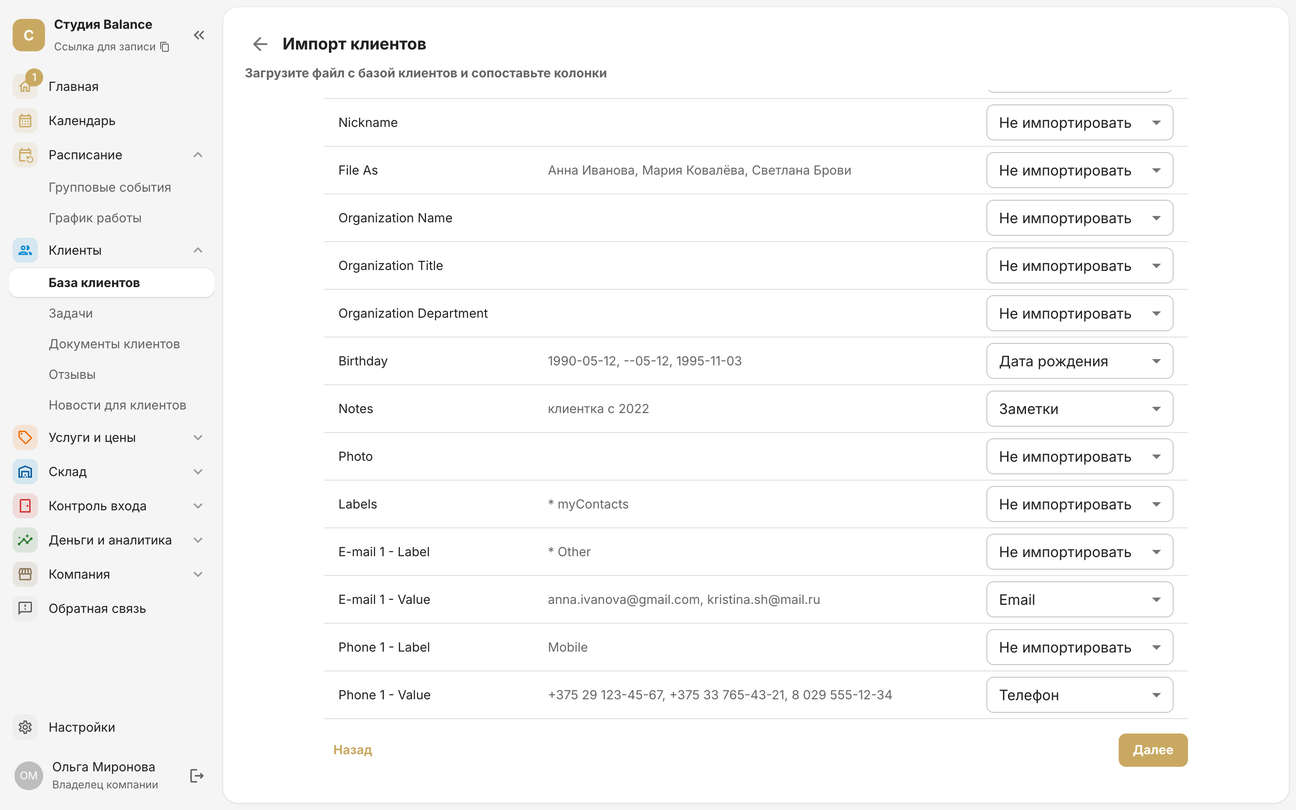
On the Check step, errors usually come from numbers saved awkwardly: a landline, a foreign number without its country code, or two numbers on one contact — Google puts them in one cell separated by “ ::: ”. Birthdays without a year aren't imported: the client is added without a date.
The Clients in the file have visited you before switch applies to the whole file. If some contacts only asked about your services and haven't visited yet, leave it on and later remove the mark in their profiles with Restore — then they'll get the first-visit price.
Groups and WhatsApp Business
- WhatsApp Business labels can't be exported: they help find chats but don't give a list of numbers. Save the clients you need to the phone's contacts.
- Group members are listed in the group info, but there's no export button — only copying by hand.
- Export chat exports messages, not contacts, so it won't help move your client base.
- We don't recommend browser extensions that “pull” contacts out of WhatsApp Web: they get access to all your chats, and WhatsApp may ban the number for automated data collection.