Services step
At the Services step, the client chooses what they'd like — one service or several in a single booking.
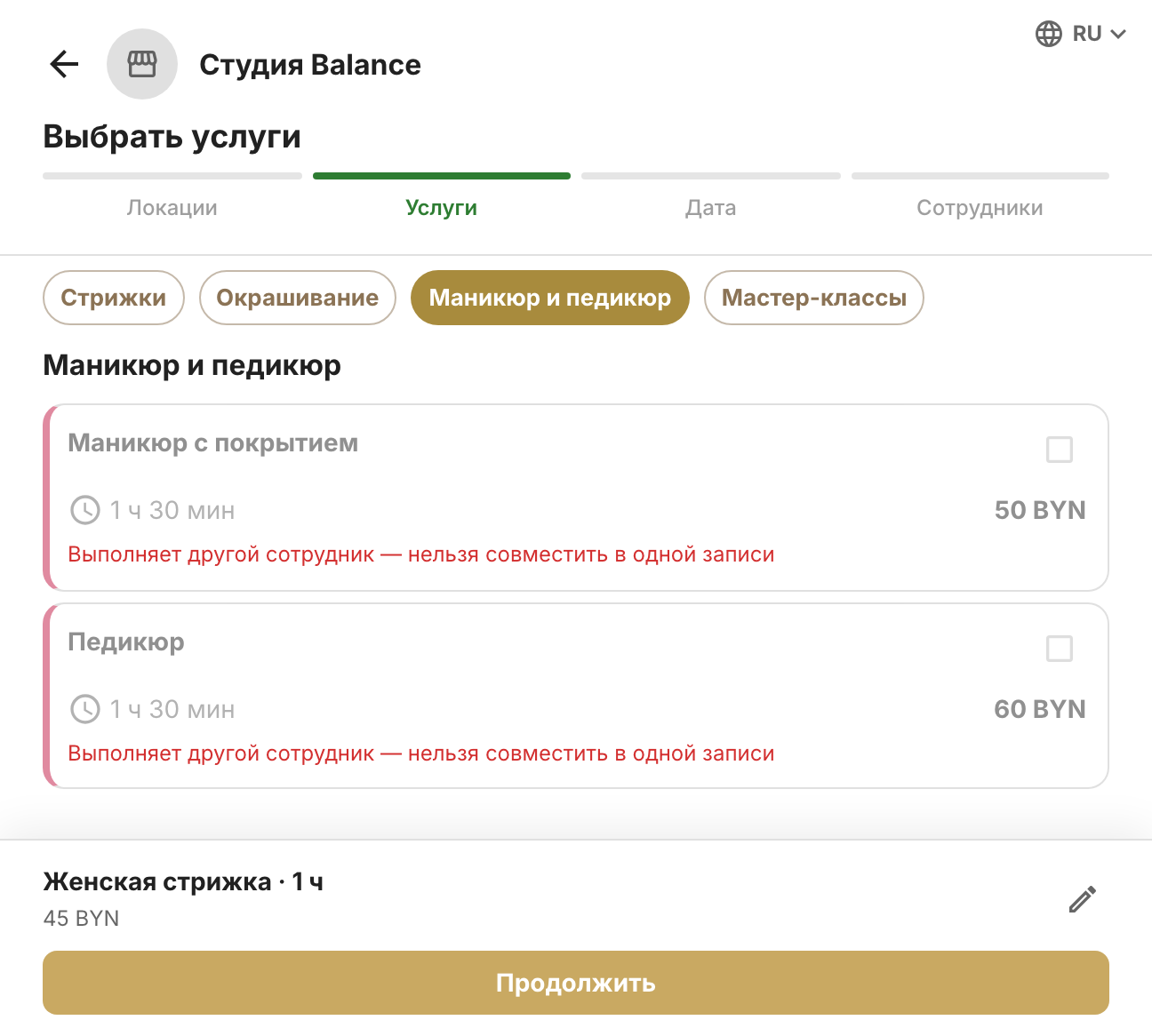
How the list works
Services are grouped by category in the same order as in Services and prices → Services — that's where you reorder categories and services by dragging them. If there's more than one category, tabs appear above the list: tapping one scrolls to that category.
Each card shows the name, description, duration and price. If special first-visit terms are turned on for the service, the offer appears under the price — for example, “35 BYN first visit”. The discounted price applies if the client is booking with your company for the first time: this is checked by phone number at the confirmation step. Clients you've marked as Visited before — on the client's page, when adding them or when importing your client base — don't get it.
Which services are listed
- A regular service (the regular type — booking during working hours) is shown if one of the employees in its performers field has a shift with a free window at least as long as the service. An empty performers field means any employee will do.
- An event-only service (the type for events — booked only through scheduled events) is shown if the schedule has a group session with it that hasn't started yet and still has free spots.
- Archived services aren't shown.
Several services in one booking
A client can select several regular services — say, a haircut and colouring. They become one booking with one employee: durations and prices add up, and times at the Date and time step are matched to the total duration.
That's why some services may become unavailable, with the reason shown underneath:
- “Performed by another employee — can't be combined in one booking” — this service and the ones already selected have no performer in common;
- “Doesn't fit the selected time (30 min left)” — the client picked a time first, and less time is left before the next booking or the end of the shift than the service takes.
An event-only service can be chosen only on its own, one at a time: while anything else is selected, it's unavailable, and vice versa.
How the list depends on other choices
- Branch chosen — services provided at that branch: their performers have shifts there, or a group session with the service takes place there.
- Employee chosen — only their services: those where they're among the performers or no performers are set, and only if their shifts have a window long enough for the service.
- Date chosen — services with free time or a group session that day.
- Time chosen — only regular services that can start at that time; event-only services are hidden.
If a service is missing, check its performers, duration and type.